118 – Jointer Setup
Download HD .mp4
I find that the jointer is one of the most complex tools to calibrate. But if you ever used one that was out of shape, you know exactly why calibration is critical to your success. I hear from so many woodworkers who think their jointing problems are due to technique, when in reality, its the jointer itself that’s presenting the issues.
Its a two-part process that starts with leveling the infeed and outfeed tables and making them coplanar. Next, you need to adjust the knives in the cutterhead so that they are in line with the outfeed table. Neither process is fast, but I’ll take you through it step by step.
Hidden inside this video is actually a bit of a product review. There are many jigs on the market that will help you set up your jointer knives. I wanted to try a few of them so that I could give you a recommendation one way or the other. Here are my biased and opinionated findings:
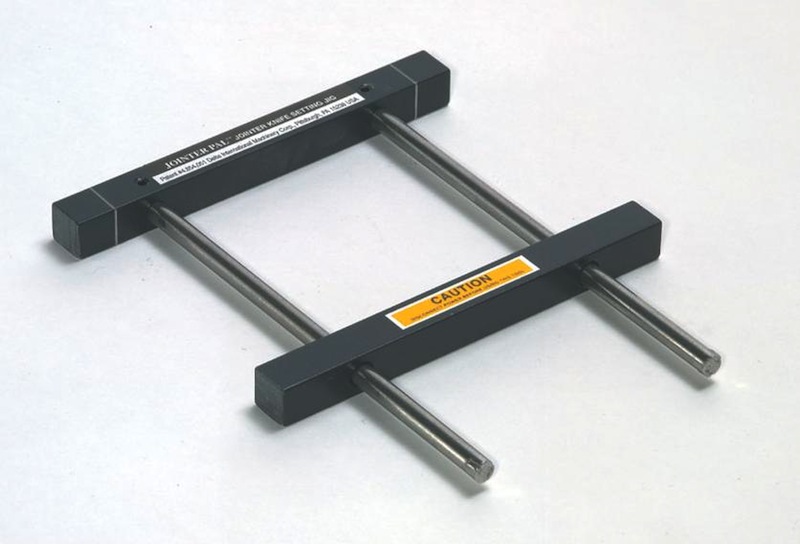
Jointer Pal – ($27-$84) This is the jig I’ve been using for years. Its perfect for folks who don’t want to fuss around with dial indicators since the magnet does all the work. And it is fast and easy to use (about 3 minutes per blade). But since jointer blades tend to raise up when you tighten them in place, you have no way of knowing if your blades truly are level with the outfeed table. Mine showed a variance of .001-.005 across the length of the blade. All in all, that’s not to bad considering the quick setup time. But its far from perfect. And in order to use this jig properly, you have to find the top dead center of the blade’s path, which is usually easier said than done.
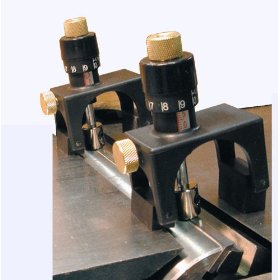
MLCS 9397 Jointer Planer Knife Setting Jig ($79) – By far, my biggest disappointment in the test. Like the Jointer Pal, this system works using magnets, only this one bridges the infeed and outfeed tables. It also has a nice dial that you turn to raise and lower the center magnet, which allows you to micro-adjust the blade. But I found that the blades still move when they are tightened down and the magnets didn’t provide enough force to prevent this from happening. This pretty much defeats the purpose of the micro adjustments. Furthermore, I don’t see how this would be useful as a standalone jig. You still need a dial indicator to tell you what the height of the blade is relative to the outfeed table. Otherwise, you are pretty much flying blind. And unlike the Jointer Pal, there is no built-in reference point. So I am going to recommend skipping this product.
OneWay Multi-Gauge ($94) – Essentially this is just a variation of the classic dial indicator jig. But holy moly is this thing awesome! The jig is incredibly heavy and has a nice wide foot-print. The dial indicator features a wide flat foot that is critical for setting the knives. The standard tapered tip that comes with most dial indicators just won’t do. The dial indicator itself is mounted in such a way that it faces you, which is incredibly convenient when setting knives. This unit is absolutely rock solid. But in my shop, its use will most likely be limited to setting up the jointer, the planer, and the drum sander.
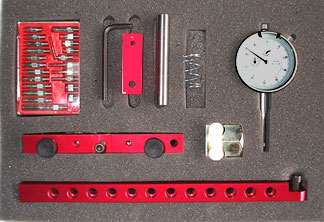
Deluxe A-Line-It ($145) – This is another variation of the dial indicator system, only this unit does a bunch of other things too. It truly is a jack of all trades setup jig and will help you calibrate everything from the tablesaw, to the drill press, to the bandsaw! The dial indicator comes with numerous tips, including a flat one. So how does it compare to the ONEWAY? Its lighter and less stable due to the 3/4″ wide aluminum base. The foot on the dial indicator is not as wide as the ONEWAY, which is not a huge problem but that extra width is truly appreciated. And the dial on this unit faces the infeed table, instead of the user. Seems like a minor thing until you have to stand up to view the gauge head-on about 40-50 times.
So my final verdict? If you want cheap and simple with somewhat unpredictable results, go for the Jointer Pal. If you want a jack of all trades setup jig, go for the A-Line-It. And if you want the best jig for the job, get the ONEWAY. And if you don’t want to deal with any of this crap, get a helical head!


Great advice. Planning on getting a jointer soon.
Perfect timing on this on Marc! I first found your site when I was looking for tablesaw setup info and I’ve been battling with the best way to do this on my new jointer for a while now. Would love to see the thicknesser setup process as well some day to complete the trifecta ;)
Michael
That’s definitely on the list!
The best thing that I ever did for my jointer was to refit it with a new helical cutter with carbide inserts. Set up is a snap, the cutters stay sharp longer and the performance of the machine and results that I get are much better.
I think it is about time for me to check my jointer. I have never done it, and I think I have a small problem. I can’t seem to get rid of a bow in a board. I don’t know if it is me or the jointer. This should eliminate at least one of the variables.
Now all I have to do is buy a jointer!!! Knowing is half the battle…
Jointer calibration … almost the most important “trueing” to be done in the shop! Mine was so undependable, for so many years, that I found myself not even using the jointer. I limped by using an inane combination of the planer and the table saw. I never had real confidence that I could mill a simple piece of square stock … squarely to a dimension. This affected all of my woodworking. I, in many cases, would back-off of any attempt to make anything but the most basic jigs. And, without realizing it, I started to limit building anything. I think for years that all I really did in the shop was repair stuff.
Then I met Dr. Tool, a retired machinist, with a Doctor’s bag of the most amazing calibration tools that I had ever seen. My shop is now “humming” again and there is little that I will not attempt with confidence.
And it all started with getting the jointer calibrated!
I know you said that the set up process on the table can take 4-5 hours; do you plan on the whole process being a two day event, between table and blades? Considering this is an annual or semi-annual event, does this go on a calendar, or is it something done only when you feel like it is needed?
(I ask since I don’t have one, and am curious. I’m also looking forward to the planer version of this video, and wondering if the techniques are compatible with the benchtop versions. No time pressure, though.)
I basically plan on devoting a day to the setup. If I finish early, like I did this time, that’s just a bonus. :)
As far as the frequency goes, I do this whenever I sharpen my blades, which is typically once a year these days. The knives have to come out anyway, so its a good time to check all the settings.
I was considering buying a Grizzly GO586 ,your video has made me reconsider. Do you consider non-parallelogram adjustment a deal breaker. The thought of stuffing strips of soda can or cheap feeler gauges in the ways seems onerous.
Depending on your budget it might consider it a deal breaker. After this podcast I decided to tackle the set up of my G0654 joiner only to discover what you did…shimming with soda can strips!!!!???? I can’t even really make sense out of where to add the strips of soda can to make the adjustments.
If anyone has and tips for this please let me know!
Hey marc,
Thanks for the video i just purchased a joiner and until now have been pretty clueless about the set up. Also just wanted to throw in this link for a cheep, pretty good quailty Dial guadge think it is around 25 bucks!!!
http://www.amazon.com/gp/product/B0000DD0VA/ref=cm_cr_asin_lnk
when I recieve it i will let every one know how it is
Of course all those adjustments depend on your table being flat…
I know about interrelated/interlocking adjustments for sure!
Once piece of gear I worked on in the Navy had (literally) 30+ adjustments, each of which effected some subset of the remainder. Aligning the beast was so complicated that the Navy provided what we called the ‘bedsheet’ – a flowchart of what to check and adjust at each stage. We called it the ‘bedsheet’ because it unfolded to about four feet by three…
For obvious reasons if the damm thing was running anywhere near properly, we left it the h__l alone.
How often do you find that your table is enough out of whack that you need to set up again? What will cause the most trouble? Adjusting heights? Board feet jointed? Time?
Well in the few years I’ve owned this jointer, this is only the second time I had to make an adjustment. And this is after an insulation guy stood on the outfeed table and I moved the jointer from one shop to another. Even then, it wasn’t THAT far out. So really, it depends on all those things: brand, use, adjustments, time, etc….
I am amazed that you only change your blades once a year. Do you use aftermarket blades? I have a 6″ jointer from Grizzly with the stock blades. I am only a hobbyist and do not woodwork very often, but I usually change my blades at least twice a year.
I am not sure if I am too picky. I heard that once the jointer starts making dust instead of shavings I should change them. I usually change them when some dust start coming out, but it’s still mostly shavings.
Anyways, back to jointer setup… I have always used a dial indicator with the magnetic base, but for the longest time, I have been thinking of making a jig like the OneWay, but out of wood.
I actually just use the Powermatic stock blades right now. I probably run the blades quite a bit longer than I should. But I usually just monitor the cut quality and the general amount of pressure required to push the wood through the jointer. At the pace that I woodwork, I don’t really find it necessary to sharpen more than once a year.
Thank you, Marc. Come to think of it, sometimes, I use construction grade 2x4s in my projects. I think that may be the reason why my blades get dull so quickly.
No Apple or AT&T adds?
This video was perfect! I just bought a jointer(used) but was having some problems with getting it nicely tuned up, thanks so much for the video and advice!
Nice video Marc. Just makes me want to buy a jointer all that much more!
Now if I can just convince my wife to let me buy one. lol
Hey Marc, get video.. I would definitely want to see the planer and drum sander setup. And watching you adjust those beds, helped me to solidify the decision on parallelogram beds for the next jointer.. Thanks for the info.
Chuck
This vedio is nice except that I don’t understand why would someone buy these stuff! ain’t the machine (jointer) should be equiped with its own instruments for adjusting the layers of both surfaces and the blades? further, why should I set the blades higher than the zero index as long as I can control level of cut by adjusting the starting layer (let it be 1st layer)?
Neverminde, you guys are doing great job.
Well they SHOULD come with setup tools but they don’t. So that’s why we have to buy this stuff. And explaining why the blades need to be slightly higher has more to do with the relationship of the blades to the outfeed table and not the depth of cut. I don’t exactly know why it works but it does. All i can say is try it with the blades dead even and you’ll see what I mean.
I seem to remember setting my blades at exacting the height of the outfeed table. Maybe that’s why I don’t use it much.
Question that you mentioned you were going to address and you didn’t (unless I can’t hear, in which case I’ll put on the dunce cap).
Should a person in the market for a jointer/planer go for the helical head or the straight cutter knives. I’m curious what people have to say about this? Especially those who may have used both.
Yeah I kind of forgot to cover that. Ultimately, the helical head changes everything when it comes to setup and general convenience. You’ll end up with a smoother cut as well. So if its in the budget, hands down, I would say go for the helical head.
I suspect straight knives will go the way of the dodo within 5 more years. My jointer cost an extra $350 or so to get the helical head, but it was worth every penny. Knife setup is never an issue, an if you get a nick somewhere on a blade, you simply rotate one of the square knife elements 90 degrees. Replacing all the knife elements wouldn’t be cheap, but you when one gets dull you still have three more fresh sides to use. The only difference in Marc’s setup instructions are that you just rotate the head so the blades are below the table either in the front or the back when you do your calibration.
Very important info on the set up of a jointer presented in an informative well thoughtout vid. Really breaks all points down as they shoud be. Great job Marc, as usual.
Thanks Donnie!
Great video. I got an 8 inch jointer about a month ago and struggled to get info on setup. What is the tool you use to turn the adjustment things on the table. is that just a socket wrench attachment??? Mine is a parallelogram style jointer too so it uses the same mechanism. The manual is very vague on what to use to turn the screw.
Thanks
Yup just a big old socket wrench.
is it a standard size or something special for jointers?
Wait you mean the jointer isn’t supposed to make wedges?? In all seriousness that was a great vid and will be very useful.
So I spent this evening refining my jointer. After I was complete, I ran the same boards that I was having trouble with earlier and bingo, what a difference that made. Thanks again!
Thanks for the video. It is just what I need to inspire me to work on my jointer.
Marc,
Another great video, very, very helpful info. I have a 6 inch jointer in storage that I would have used as soon as possible. Now I know what the first thing I’ll be doing once I get my space back. Keep up the great work.
Matt
Great video Marc but I still like the “Jointer’s Jumping” video! It was also great meeting you last weekend at Highland Ridge. Hope you had a chnace to get to some of our bbq establishments while you were in ATL.
A superb instructional video. Thanks for taking the effort to make it, and the generosity in sharing it.
DD
Great Video very informative
Nice video and a great lesson. But I am a bit stuck on your original measurements. How is it possible to get a parallel measurement across the near side (.0012 across blade side if I recall) and a non parallel measurement across the back unless the infeed table is not flat? Or is it simply that the amount of run out you found is acceptable?
My tables are in pretty good shape, but they aren’t dead flat. And that would be the reason for a little discrepancy. But when you measure the points on the infeed table, its a good idea to not only measure at the extremity, but all along the straight edge to get a good idea of how flat the table is overall. Pick one point alone and you could find yourself in a little dip.
Great vid. Adding in Nicole with some background was awesome. I teach high school and I admire your smooth, accurate, personable presentation style.
Is there any reason not to use the straight edge setup for the back, using the hold-down, for the blade edge also? It would reduce a few steps and make a long setup maybe a little shorter.
My jointer came with a setup jig. But I can’t for the life of me figure out how it’s supposed to help. I read the manual and tried to use it, but it was an exercise in futility.
DON’T FORGET TO CALL YOUR MOTHERS!!! I know that for at least ONE person, this will be the reminder that keeps him or her out of trouble. You’re welcome.
The TS-Aligner Junior seems like it would be a better tool than the Deluxe A-Line-It, for about the same cost. Has anyone used one?
Yes I have one and I’ve used it to set up my jointer and tablesaw. I works great. Oh my son Jason used it to set up the gears in a F-250 rear end too.
Claude
Based upon Marc’s demonstration of the One Way, do you think the Aligner Jr. is superior?
let me make sure I understand… you are trying to align two surface (neither of which have been checked for their flatness) within a .001 or so with a stick of aluminum that it’s spec claims a flatness of only .003 over it’s length (not to mention it is subject to distortions due to it’s coefficient of expansion). Don’t get me wrong I am all for proper machine setup but one must realize the practical limits of the tools. Chasing .001 with a something that could be off as much as .003 on a surface that you don’t even check to see if it is flat is actually pretty silly.
My tables have, in fact, been checked for flatness. The video is generally describing a “perfect” scenario with flat tables. Obviously the more out of flat your tables and straight edge are, the less accurate this process is. When measuring with the feeler gauges, I like to not only measure the outer points but also across the entire length of the straight edge. That should give you a pretty good idea of how flat your table is. If you have a bunch of dips and valleys, you need to keep that in mind as you decide what level of error is acceptable. Even if your tables are not flat, I believe this method will get you as close as you can get to two coplanar surfaces, which is the ultimate goal. But it certainly helps to get some idea of how flat your table is to begin with, and keep that in mind as you make your adjustments.
I am trying to present a realistic way of bringing your tables into alignment, using the tools and materials available to most woodworkers. And this is the way that works for me. If you have a better method, I am all ears.
Marc
While I might disagree with the need for such fussiness given the inherent nature of wood (I tend to focus on things like sharpness and proper technique rather than .001 alignment precision), I make no claim that your method is flawed. My comment isn’t a critique of your methodology it was precisely (pun intended) about the claim of precision. The precision of any measurement can not exceed the precision of the least precise device used in the measuring. Given the inexperience of many of your viewers I believe it is worthwhile to point out the underlying error that is inherent in the method.
There is no underlying error inherent in the method. There is only a hypothetical error based on the assumption that the straight edge is imperfect. If the tool happens to be perfect, the measurement will be perfect. If the tool is imperfect by .003, the error is still insignificant for most purposes. I don’t think the ‘inexperienced viewers’ have much to worry about.
DD
Dan
Sorry for confusing you. When speaking of error regarding the precision it can be confusing. Error in this context refers to deviation (not a mistake). Also, manufacturing to a tolerance is not ‘hypothetical error’ but in fact is a tolerance that needs to be ‘carried’ through when recording measurements from the device (usually noted as +/- number). But anyways, what we clearly both agree with is that in the scheme of woodworking 3 decimal place precision is insignificant whether you are experienced or not.
Actually you are talking about hypothetical error here. You don’t know what the exact error of my straight edge is. The +/- .003 is a guaranteed flatness from the manufacturer. That means some could very well come off the line perfect, and some could be as far out as .003. The manufacturer is simply telling us the error could be as much as .003. You also don’t know the error level of my jointer bed. If I place my straight edge on the bed, and I can’t slip a .001 feeler gauge underneath it at any point, .001 is now a valid and attainable level of accuracy. Whether woodworking requires this is a different story. But in my opinion, if you can get the machine set up even close to that level of precision, with only a little more effort and using the same technique I describe in the video, why not do it?
But Marc, what if your feeler gauge has a tolerance of +/- .003?
(Now I’m really confused) ;->
Not knowing is not equal to hypothetical (if we are talking about actual definition, lol) and oh btw the claim from the manufacturer is a flatness precision of .003 total not +/-, the notation of +/-.003 actually means a total of .006 of variation… i am going to stop howling at the moon now… lol
And now you know why I normally don’t mess with this .001 crap. It seems to be an open invite the “well, actually” folks.
Well Actually I’m, LOL
Well – I get what you were on a about :)
And yes – you obviously have to be mindful of ‘how straight-full your straight edge is’ (?!)
Bent rulers create bent lines and all
:)
Marc,
Great video, I’m planning on purchasing a jointer in the next few months. I am debating between powermatic and jet and I will probably go with the helical cutters.
Marc, thanks for a great and very timely video as I am planning a shop rearrangement followed by a complete tool checkout prior to starting my next big project, a dresser for my 6 year old daughter.
For those who want to follow Marc’s lead with the Oneway Multi-Gauge, the Oneway site (in their “Bargain Bin”) is selling cosmetically imperfect gauges for $80 plus shipping. As of 1 pm Monday, May 10, they have 18 left. Well, maybe 17 if they hadn’t taken mine off the list yet…
I have the Powermatic 60B 8-inch Jointer. The only adjust on the tables that I can see are gibs with gib set screws. From reading the manual it looks like you don’t need to level the tables unless the gibs become loose. When I bought the jointer I paid for delivery and setup. I have never tried to level the tables, just level the blades to the out feed table when replacing them. After reading the manual it is not real clear how to adjust the tables. Maybe once I remove the gib screws it will become apparent how to level the table using the gibs.
Does anyone have this jointer and have leveled their tables?
I always find the manuals confusing until I actually start taking things apart. That’s where I would start Bob.
@BedrockBob,
To adjust parallelism on a wedge-base jointer like yours (if necessary), you have to shim the beds. I think people recommend slim pieces of sheet metal.
Marc, Enjoyed this video as always and I’m looking forward to seeing the counterpart for the planer (hint hint). I’ve been scared to pull the knives out of my jointer, until now thanks to you. It looks very simple to put back together and setup.
Marc – great video as usual, very nice walkthrough.
I understand that you decide to re-check the tables coplanar when you change out your knives – but do recall any noticeable difference in woodworking operations once complete? Did that .004 that you adjusted to the tables end up with noticeably better results when it came to assembly or other operations?
Curious when you might find it time to check coplanar based on woodworking results, rather than just straightedge/feeler-gauges telling you that things are off.
Hey Morton. Generally, when you start cutting tapers, and you can’t properly joint 4′ and longer boards, its time for a tuneup. And although making a few slight adjustments once a year when I change my blades may not actually make a noticeable difference in performance, I consider it preventative maintenance. So instead of waiting for the jointer to produce poor results in the middle of a project, I fix it while I’ve got the setup tools out anyway. On a good jointer, you probably won’t have to adjust the tables each time anyway.
Marc, I have become expert at performing this setup after having a problematic 8″ Grizzly jointer that went way out of parallel after about 20 minutes of use. I replaced that jointer with the same Powermatic you have and am hoping it stays in tune much longer. To that end I replaced the standard serpentine belt with a link belt. I’m curious, though: how flat are the beds on yours? FWW published some quite stringent tolerances (which my Powermatic certainly doesn’t meet) and I’ve wondered what kind of flatness other models of this jointer have.
I have a couple dips here and there, but for the most part, the surface is pretty darn flat with no twist to speak of.
Sorry, Marc, another question. When you make those cam adjustments, you have to loosen/remove the two set screws holding them in place. On my jointer, which is your jointer, those set screws, at least some of them, cannot be reached without removing the rabbeting ledge. Did you remove your set screws, and, if so, how did you get to the ones under the rabbeting extension?
I actually avoid those at all costs. Technically, you should be able to get the surface coplanar with only adjusting three of them. So i take the lazy way out. ;)
Marc
THANKS so very much for your instruction. I have been waiting for this. DO you think you may do one for the planer in the future.
Once again the podcast was awesome
Greg
Marc
Great video and fabulous choice in the end…funny, using the little rubber sanding forms (from Lee Valley, I’m guessing) for thumb savers and choosing the One Way Multi Gauge (made in Stratford, Ontario)…hmmm, it would appear that some Canadian ingenuity has won the day.
Cheers
John
(I don’t mean to wave the flag so much (or at least my flag) but it doesn’t get done enough above the 49th in my opinion. God, now I’m apologizing for being patriotic! How Canadian is that? …sigh)
haha nothing wrong with a little patriotism from up north. And for the record, the rubber sanding devices were from Rockler. :)
Great video Mark. I agree with your #1 pick, budget allowing, the dial indicator from Oneway. I have an older 8″ Powermatic that was the same type John White/Taunton demonstrated adjusting in his video on jointer adjustments. I replicated his jigs for table alignment and they still work well.
Just received my Powermatic pj882hh today, WHAT A FREAKIN MACHINE! This thing is a monster! The infeed table on this thing is just a long as my 6″ Jet infeeed and outfeed tables combined!
Marc,
Great video as always.
Can you give a link or at least the name of a couple of good straight edges that you like.
Here are the ones from Lee Valley:
http://www.leevalley.com/US/wood/page.aspx?p=50074&cat=1,240,45313
Here’s a shorter one from Woodpeckers:
http://www.woodpeck.com/serx36.html#1499
Marc,
THANK YOU, THANK YOU, THANK YOU!! 1000 thank you’s! I’ve read probably 30 articles on tuning a jointer, but only after seeing your video was I finally able to get it right.
Absolutely first rate presentation demonstrating how doable the process can be even for a novice woodworker. Thanks Marc!
Marc,
Great job with the jointer setup explanation. In the video you explain the need and use for a machined straight edge. What straight are you using?
Regards,
Bobbie
Mine is sold by Lee Valley. Its their aluminum model.
I have been using a magnetic base with a dial gauge to set up my Jointer with good success, but the oneway sure looks easier as the magnetic base and adjustable arms take a while to set up, but no one seems to sell the oneway here in oz.
Hope you do the Thicknesser setup with it soon, would be good to see how you would use for that?
Thanks for all the great info Marc, have been watching since day one and enjoyed every episode.
Regards
Terry
Thanks Marc great info. I was wondering if you have ever used a combo machine and if so what your impressions were. I am currently saving to buy a Laguna Platinum Series 10″ Jointer / Planer Combination w/ SCH. Since I do not own a jointer or a planer I figured I buy one combo machine and maybe later add on a slot cutting mortise attachment. I have never used the Laguna, but the guy I use to mill my lumber has a nice(very expensive) Felder combo machine and swears it worth every penny. Your thoughts?
http://www.lagunatools.com/combo/combo-platinum10s;jsessionid=0a01025a1f437f02afe52abd4580b56598505b67d5d5.e3eSbNySbxiNe34Pa38Ta3aKa350
I haven’t had much “real” time with the combo units. I played with them at woodworking shows and had a chance to look them over thoroughly. I must say, the Laguna was one of my favorites. If you are going to combine two relatively expensive machines into one, it needs to be done right and its not going to be cheap. So something like the Laguna is about the level I would probably shop at if it were me. I find the new smaller combo machines to be a little disappointing. So you are definitely on the right track. I would keep searching the forums to see if anyone has some specific experience with the Laguna. But from what I saw, I was rather impressed.
Thanks for the info. I am just a little unsure of how they keep the infeed and outfeed tables coplaner and level on a machine where the tables flip up like gullwing doors. I am atleast 6 months to a year out on the purchase so I will start on your advise and start searching the forums and web for owners on other reviews. I believe the big woodworking show comes to Dallas/Fort Worth in December and that would probably be the best oppertunity for a trade show discount. I will let you know if if/when I purchase one. I also am leaning to the spiral cutter head with individual cutters.
Great video – makes me want to run out to the shop and start the process – although I think I’ll be investing in a dial gauge first. – on to an other video
Marc, what is the height of the Multigage, have checked the oneway website but does not give the dimensions, reason for the question is to know if it will fit under my Performax Drum Sander to check the drum is parallel to the bed.
Cheers
Its 5″ tall. Haven’t tried it on the drum sander yet.
I just got the Oneway Multi-Gauge today and just finished setting my jointer with it. What a differences and much better cut without snipe.
This process helped out very much – I had just bought an OLD jointer from an auction. After spending some time making the blades sharper and setting them up using your video- it works pretty good for the few bucks that I spent. Now after using it could probably use a professional sharpening of the blades or some new ones that will fit this antique. Does anyone know of a website that might help me identify yr/make/model ??
Try this place Rob: http://www.owwm.com/
It seems to be a 1950′s shopmaster, not much info though.
Marc,
Thanks for the great video. It’s funny that I decided to check on your site for updates and saw this, as I just purchased a nice level from the home store to “tune” my jointer. I ordered the same day the straightedge from Lee Valley to tune up my jointer that I’ve now had for 2+ years and haven’t had the confidence in jointing boards. Now for the knifes, I’ve got the One-Way Multi Gauge and it’s the best thing out there – made setting the knifes EASY!
Michael